Game Boy emulator tech stack update
Play Kid update from SDL2 to a modern Rust stack using pixels, winit, and egui
0.2.0, which uses pixels to create and manage the pixel frame buffer. Since then, versions 0.3.0 and 0.4.0 have been released, which dropped pixels in favor of rendering directly to a texture. See this write-up for more information.In my previous post, I shared the journey of building Play Kid, my Game Boy emulator. At the time, I was using SDL2 to handle the “heavy lifting” of graphics, audio, and input. This was released as v0.1.0. It worked, and it worked well, but it always felt a bit like a “guest” in the Rust ecosystem. SDL2 is a C library at heart, and while the Rust wrappers are good, they bring along some baggage like shared library dependencies and difficult integration with Rust-native UI frameworks.
So I decided to perform a heart transplant on Play Kid. For version v0.2.0 I’ve moved away from SDL2 entirely, replacing it with a stack of modern, native Rust libraries: wgpu, pixels, egui, winit, rodio, and gilrs:
winit&pixels: These handle the windowing and the actual Game Boy frame buffer.pixelsallows me to treat the 160x144 LCD as a simple pixel buffer whilewgpuhandles the hardware-accelerated scaling and aspect ratio correction behind the scenes.egui: This was a big step-up. Instead of my minimal homegrown UI library from the SDL2 version, I now have access to a full-featured, immediate-mode GUI. This allowed me to build the debugger I had in mind from the beginning.rodio&gilrs: These replaced SDL2’s audio and controller handling with pure-Rust alternatives that feel much more ergonomic to use alongside the rest of the machine.
Debug panel
The most visible change is the new Debug Panel.
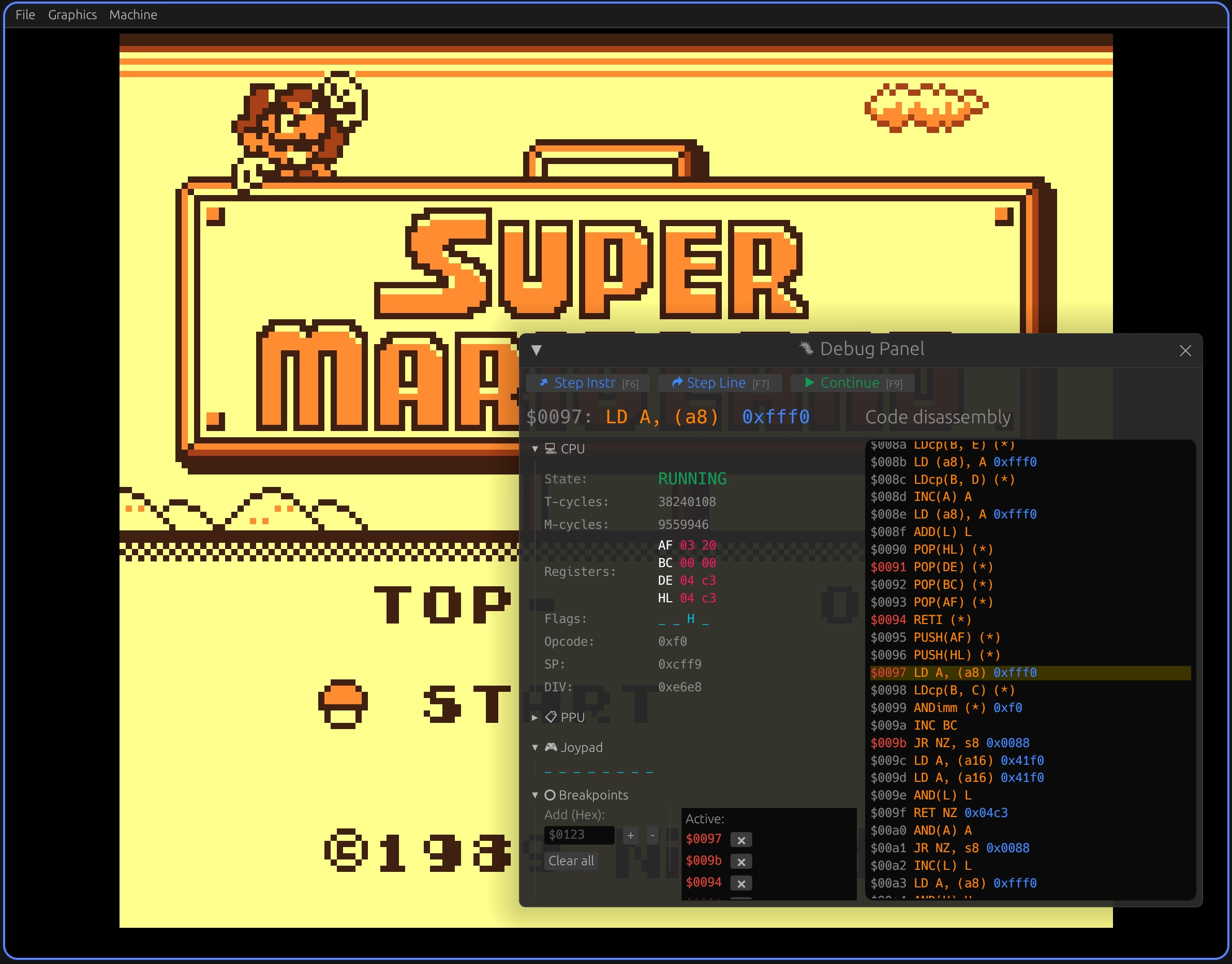
The new integrated debugger features a real-time disassembly view and breakpoint management.
One of the coolest additions is the Code disassembly panel. It decodes the ROM instructions in real-time, highlighting the current PC and allowing me to toggle breakpoints just by clicking on a line. The breakpoints themselves are now managed in a dedicated list, shown in red at the bottom.
The rest of the debug panel shows what we already had: the state of the CPU, the PPU, and the joypad.
Playing around with the new Play Kid UI based on egui.
Dependency hell
Of course, no modern Rust migration is complete without a descent into dependency hell. This new stack comes with a major catch: pixels is a bit of a picky gatekeeper. Its latest version is 0.15 (January 2025). It is pinned to an older version of wgpu (0.19 vs the current 28.0), and it essentially freezes the rest of the project in a time capsule.
To keep the types compatible, I’m forced to stay on egui 0.26 (current is 0.33) and winit 0.29 (current is 0.30), even though the rest of the ecosystem has moved on to much newer, shinier versions. It’s kind of frustrating. You get the convenience of the pixels buffer, but you pay for it by being locked out of the latest API improvements and features. Navigating these version constraints felt like solving a hostage negotiation between crate maintainers. Not very fun.
Conclusion
Despite the dependency issues, I think the project is now in a much better place. The code is cleaner, the debugger is much better, and it’s easier to ship binaries for Linux, Windows, and macOS via GitHub Actions.
If you’re interested in seeing the new architecture or trying out the new debugger, the code is updated on Codeberg and GitHub.
Next, I’ll probably think about adding Game Boy Color support, but not before taking some time off from this project.