What is the probability of getting an all-numbers Git hash prefix?
By Toni Sagrista Selles
3 minute read
Today, I was playing around with a new feature in Gaia Sky, and I created a new release from master. Immediately, I noticed something unusual in the generated package name:
packages-3.8.0.066962508
The 3.8.0 part is the release version, while the last 9 characters are the abbreviated Git commit hash.
Usually, that last part looks something like:
packages-3.8.0.a31f7c92e
This time, however, every single one of the hash characters is a number, 066962508. My first stupid reaction was thinking that something had gone wrong. However, git log confirmed the hash was fine.
feat: Handle gaiasky:// URLs forwarded from second instances and macOS open events. Part of #935.
- Scope dataset URL dedup to the startup path only, so re-sent URLs are always processed by the running instance.
- Register install4j StartupNotification listener for macOS open-URL events, with pending-URL queue for pre-UI arrival.
- Add --enable-native-access=ALL-UNNAMED to launcher VM parameters - Add compileOnly install4j-runtime dependency.
Obviously, I asked myself, “how likely is that”? So I did some digging.
Version 152 of the popular browser includes an option to enable JXL in Labs
By Toni Sagrista Selles
2 minute read
Yesterday, Firefox 152 was released. In the release notes, under the Firefox Labs section, it states:
The Firefox Labs section of the release notes of Firefox 152. If you see JPEG-XL works!, it means your browser is JPEG-XL capable. If you see JPG :(, it means your browser does not support it.
New open models provide amazing value for local inference
By Toni Sagrista Selles
4 minute read
Building on the previous post about how good current open TTS models are, this post focuses on local LLMs, and their explosion in quality in the recent years months. I have been using OpenRouter with, for the most part, DeepSeek v4 Flash. It is a very capable model, dirt-cheap (seems to be heavily subsidized, at $0.14/M tokens input and $0.28/M tokens output), and it works very well when it is free to browse the internet. I have also been tinkering with local models like the Qwen3.5 family, Gemma 3/4, Mistral, and more. They are good, I haven’t been able to use the versions that can run reasonably on consumer hardware for anything too productive. That is until now. The brand new Qwen3.6 models, particularly the 27B dense, and the 35B A3B MoE, have really impressed the community. They are trivial to run on common setups (e.g. 16GB RTX card, ~32-64GB RAM), and when boosted with agentic capabilities, they perform very well.
It is now possible to do high-quality TTS on local hardware very easily.
By Toni Sagrista Selles
4 minute read
Around 2007 I spent half a year in the University of Aberdeen working on my final year project involving NLP. The project consisted of a series of modules to build an graphical adventure-type game controlled by language input in the form of text. It also featured speech output generated by an early TTS system. To achieve this, we managed to partner with a group at La Salle University that were working on a TTS system for Catalan. It was a closed system that was accessible via a web API, but that option was far too slow for real time use. I ended up preprocessing the audio of all dialogs in the project into WAV files just to be able to play them in sync with mouth movements. At that time, I was amazed that a computer could so easily convert text to an understandable audio file. The voice was very plain and robotic, with no emotion whatsoever. The results were hit or miss, but it worked.
Fast forward to today, TTS systems are everywhere. Several groups have released low-parameter TTS models that run very well on consumer hardware. I have been using the lightweight Kitten TTS for a while with fantastic results.
How I fine-tuned Qwen3.5 4/9B models to become Gaia Sky experts
By Toni Sagristà Sellés
24 minute read
A little over a year ago I set up a local pipeline to use different LLMs to respond to Gaia Sky questions using RAG. In that post, I built a dynamic scrapper that parsed the Gaia Sky website and documentation and ingested the content it into a vector database. Then, I built a minimal terminal chatbot interface that received the user prompt, queried the database for semantically similar data, and built up the context for each LLM call. The results were promising, and I found that they (obviously) strongly depended on the model used.
Fast forward a few months, and the Qwen 3.5 models were released by Alibaba. The general consensus is that they are quite good for their size. I’ve been testing them for local inference with a similar impression. I thought that it would be interesting to repeat the exercise of creating a Gaia Sky AI assistant, but using a radically different approach: Instead of RAG, I would fine-tune the model itself. In this post, I describe this fine-tuning project, from the creation and engineering of the training dataset to the fine-tuning and production of the final GGUF models.
Second attempt at adapting Canon EF lenses to Fuji X, this time with much better results
By Toni Sagrista Selles
5 minute read
A while back I reviewed the Viltrox EF-FX1 adapter, my first attempt at bridging my old Canon EF and EF-S lenses over to my Fujifilm X-S10. The abridged version of that experience: it was frustrating. Firmware roulette, random errors, camera freezes requiring battery pulls, and auto focus performance that varied wildly between versions. I kept it because it was just good enough, but it never stopped feeling like a workaround rather than a solution. Moreover, Viltrox never released any further firmware versions, so the 2.29 blob tested in that post really is the last firmware.
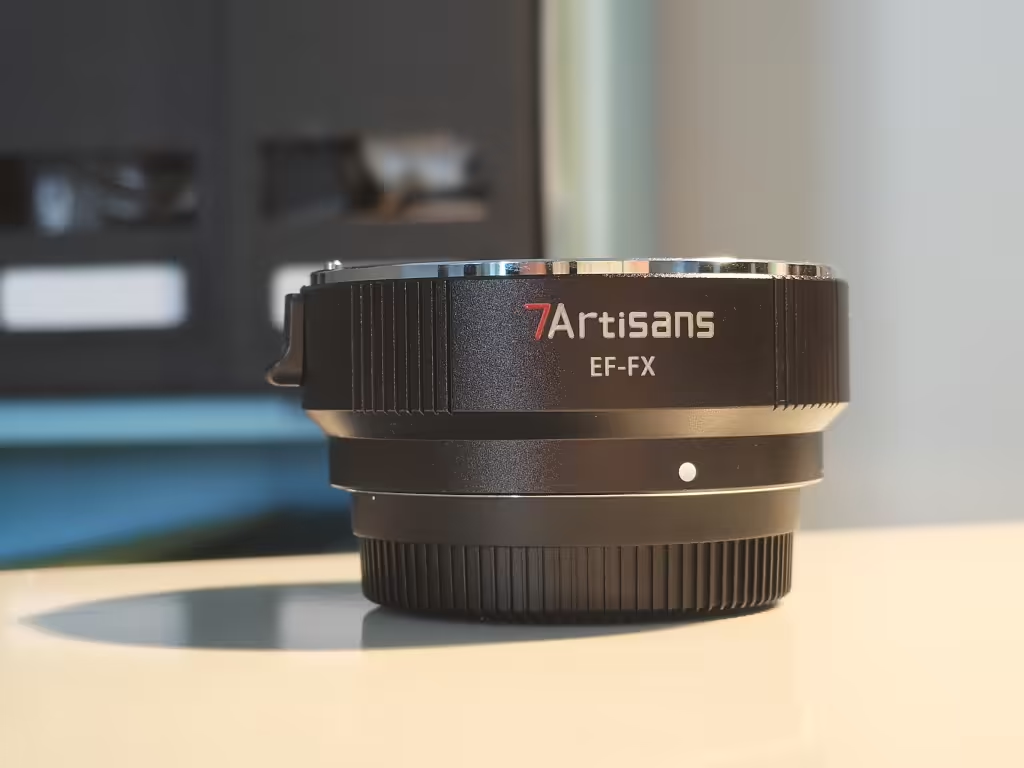
The 7Artisans EF-FX lens adapter. It is a good and cheap solution to use your old EF/EF-S lenses on your Fuji X-mount camera.
Fast forward to recently, and I decided to give the whole thing another shot. This time with the 7Artisans EF-FX adapter. Same concept: an electronic adapter with auto focus support, aperture control, and EXIF data transmission, and at 119€ it sits right in the same price bracket as the Viltrox. But is it actually better? Spoiler: yes. Let me walk you through it.